
Multiple files OK
Add images using the panel on the left.
They'll appear here ready to compress.
Other Useful Tools
When Do You Need to Compress Image to 10KB?
There are many situations where you need to compress image to 10KB. Here are the most common use cases:
Government & Job Application Forms Many government portals like SSC, UPSC, Railway (RRB), and state government job forms strictly require photo and signature uploads under 10KB. If your image is larger, the form will reject it. Our tool helps you compress image to 10KB instantly so your application goes through without any error.
Bank Account Opening Forms Several banks and NBFCs ask for a scanned photo or signature in 10KB or less during online account opening or KYC verification. Compressing your image to 10KB saves you from repeated upload failures.
School & College Admission Portals Online admission forms for schools, colleges, and universities — especially state board and central university portals — often set a 10KB limit for student photo uploads. Our free tool makes it easy to meet this requirement in seconds.
Competitive Exam Registration Exams like NEET, JEE, IBPS, SBI PO, and many state-level competitive exams require candidates to upload photos within a specific file size. 10KB is one of the most common limits set by these portals.
Email Attachments & Thumbnails When sending bulk emails or creating small preview thumbnails for websites, keeping images under 10KB helps reduce load time and bandwidth usage significantly.
Low Storage Devices If you are working on a device with very limited storage — like an old phone or basic tablet — compressing images to 10KB helps you store more files without running out of space.
How to Compress Image to 10KB — Step-by-Step Guide
Follow these simple steps to compress image to 10KB using our free online tool:
Step 1 — Upload Your Image Click the “Browse” button or simply drag and drop your image into the upload area. Our tool supports JPG, PNG, WebP, and GIF formats. You can upload multiple images at once.
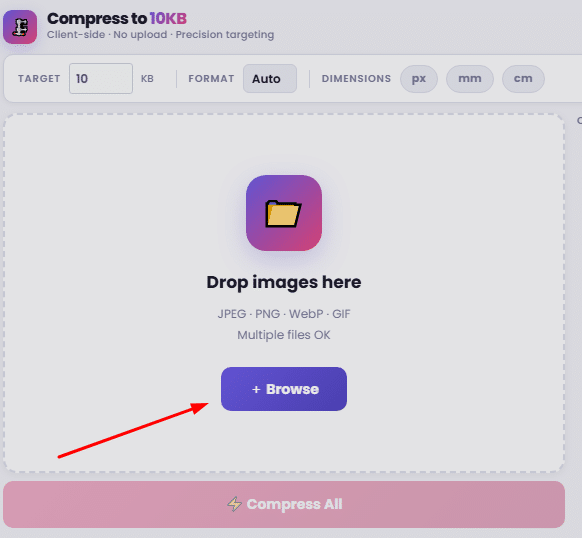
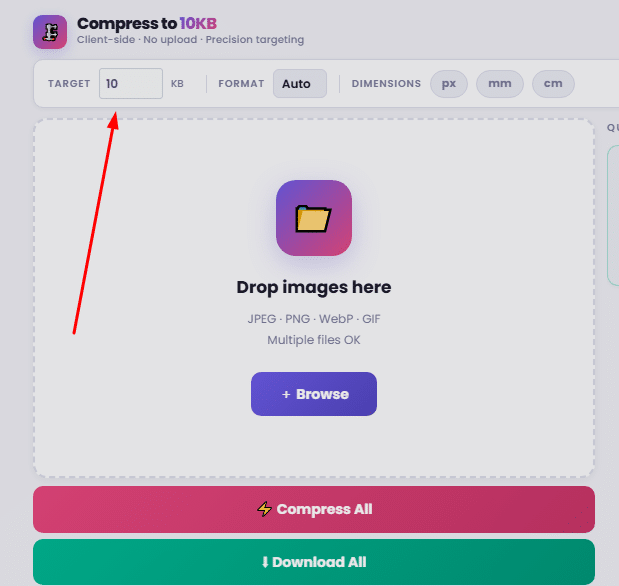
Step 2 — Check the Target Size The target is already set to 10KB by default. You do not need to change anything. If you want a different output format like JPEG, WebP, or PNG, you can select it from the Format dropdown.
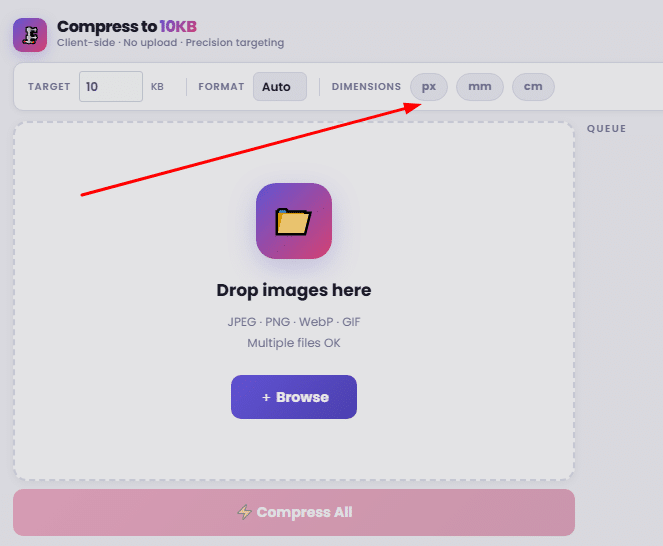
Step 3 — Set Dimensions (Optional) If you also need to resize your image to specific dimensions, toggle the px, mm, or cm option and enter your desired width and height. This is useful for passport photos or ID card images.
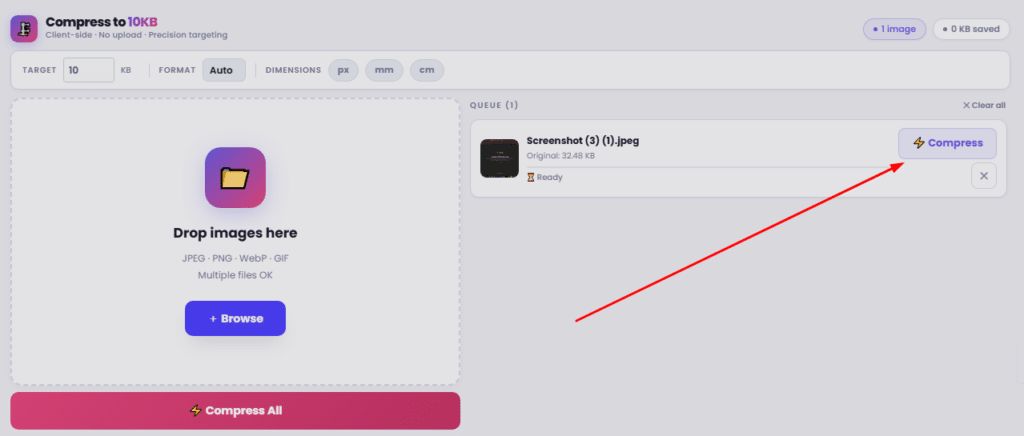
Step 4 — Click “Compress All” Hit the “⚡ Compress All” button. The tool will process your image right inside your browser — no file is uploaded to any server. Within seconds, your image will be compressed to 10KB.
Step 5 — Download Your Compressed Image Once compression is complete, click the “⬇ Save” button next to your image to download it. You can also click “⬇ Download All” to save all compressed images at once.
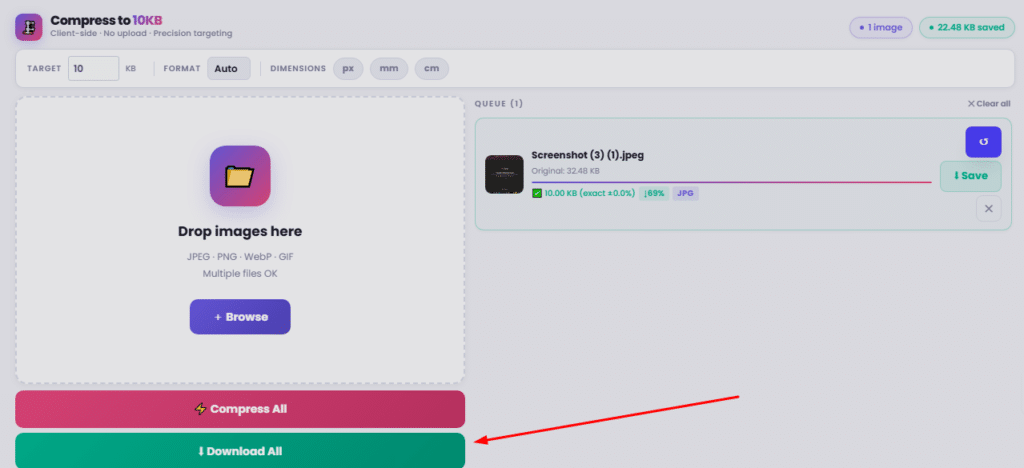
That’s it! Your image is now compressed to 10KB and ready to use for any form, portal, or platform.
Benefits of Using Our Compress Image to 10KB Tool
100% Free — No Hidden Charges Our compress image to 10KB tool is completely free to use. There is no subscription, no sign-up, and no payment required. Use it as many times as you want.
Works Directly in Your Browser. Your images are never uploaded to any server. All compression happens locally inside your browser. This means your photos are 100% private and secure.
No App Download Needed. You do not need to install any software or app. Just open the website on any device — mobile, tablet, or desktop — and start compressing immediately.
Supports Multiple Image Formats Whether your image is a JPG, PNG, WebP, or GIF, our tool handles all major formats. It automatically selects the best output format to hit the 10KB target.
Batch Compression: Need to compress image to 10KB for multiple files? Upload all of them at once and compress everything in one click using the “Compress All” button.
Precision Targeting. Unlike basic compressors that just reduce quality, our tool uses a smart compression engine to hit as close to exactly 10KB as possible — not just “somewhere around” 10KB.
Resize + Compress Together, you can set custom dimensions in pixels, millimeters, or centimeters alongside compression. This is especially useful when a portal requires both a specific file size and image dimensions.
Fast Results Compression is completed within seconds. No waiting, no loading screens, no delays.
Can I compress image to 10KB without losing quality?
To compress image to 10KB, some quality reduction is necessary if your original image is very large. However, our tool uses a smart compression engine that tries to preserve as much visual quality as possible while hitting the 10KB target. For small images like signatures or thumbnails, the quality loss is barely noticeable.
Is this compress image to 10KB tool free?
Yes, our compress image to 10KB tool is completely free. There is no sign-up, no subscription, and no hidden charges. You can use it unlimited times at no cost.
Which image formats are supported?
Our tool supports JPG, JPEG, PNG, WebP, and GIF formats. You can also choose your preferred output format — JPEG, WebP, or PNG — from the Format dropdown before compressing.
Is my image safe? Is it uploaded to a server?
No. Your image is never uploaded to any server. All compression happens directly inside your browser. Your photos remain 100% private and secure on your own device.
Why do government forms require images under 10KB?
Government portals like SSC, UPSC, RRB, and state job portals set strict file size limits to keep their servers fast and to ensure uniform document standards. 10KB is one of the most commonly required sizes for photo and signature uploads on Indian government forms.